React: Behind The Scene

I am an aspiring Web Developer. I have been building websites for a few months now. I can design, code, and deploy websites. Learning and Upskilling myself day by day.
React is a javascript library used to build user interfaces. But behind the scenes, React does a lot of work that we are unaware of. So let's try to understand how React renders a webpage under the hood.
So all of us have worked with the file App.js
Lets take a look at the file
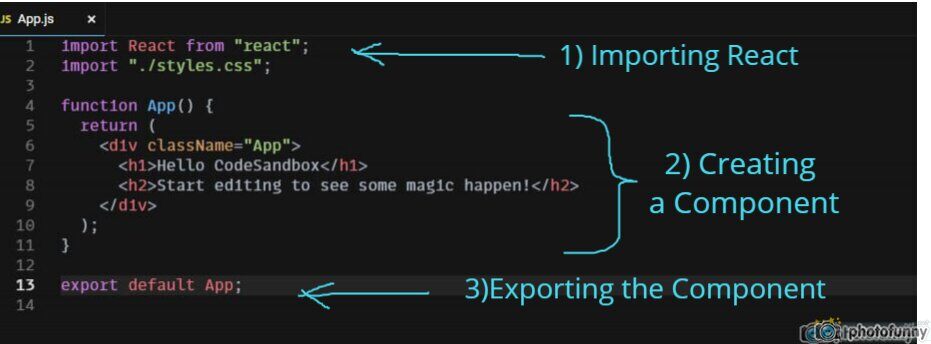
There are three sections in App.js.
1) Why are we importing React if we are not using it anywhere?
This can be answered If we understand the 2nd section. So let's analyze the 2nd section first.
2) Writing a Component
A component is a reusable piece of code. In React there are two ways to write a component
- Class Component
- Functional Component
Here we have written a functional Component named App. A functional component is a Javascript function that returns JSX.
And what is JSX?
It is an extension to JavaScript which has HTML-like syntax. JSX makes it easier to mix HTML and Javascript. Unlike pure Javascript, the browser cannot understand JSX. So React compiles JSX to regular Javascript before sending it to the browser.
React uses Babel to compile JSX into Javascript.
Lets compile our JSX into Javascript using Babel compiler (Babel Compiler).
function App() {
  return (
    <h1>This is a H1 element</h1>
  );
}
After Babel has transformed the above snippet into regular Javascript.
function App() {
    return React.createElement(
      "h1",
      null,
      "This is a H1 element"
    );
}
Babel takes the elements declared inside the function and re-writes them using React's createElement() method.
React's createElement() method takes three arguments.
React.createElement(type,{props},children)
Example
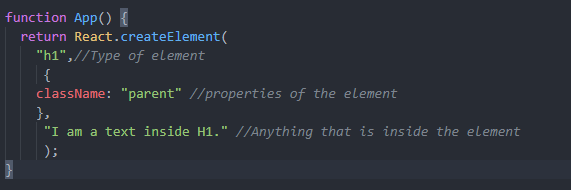
Instead of using JSX, we can write the same thing in regular Javascript as well. The output would be the same. But the problem arises when we start writing complex components where the element has too many children. The complexity of the code increases as well.
Example
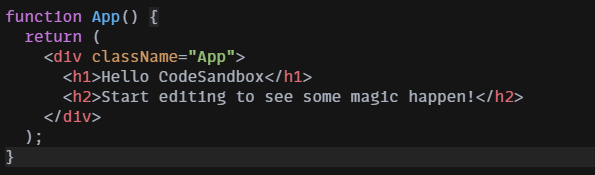 The above snippet is written in JSX. If we wanted to write the same code in regular Javascript then it would look something like this.
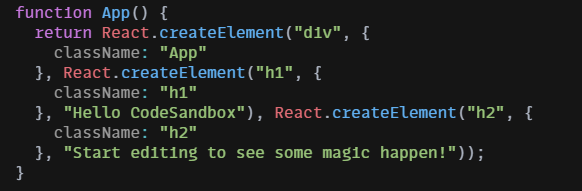
Creating elements using React.createElement() is much more complex compared to JSX. So JSX is normally referred to as syntactic sugar for React.createElement() cause it makes our life easier. This would very well explain our previous question of importing React at the beginning.
3) At the end of App.js all we do is export the component so that other files can use this component.
The second file we need to look into is index.js
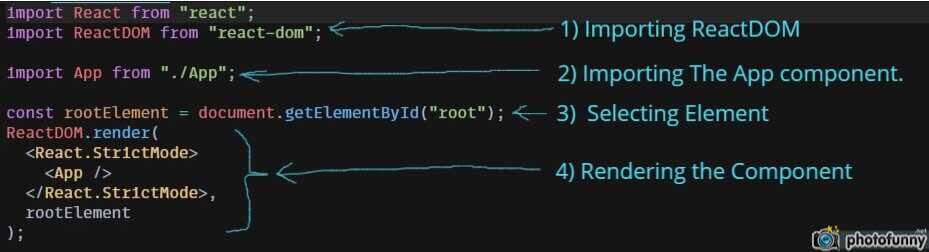
1) Importing ReactDOM
ReactDOM provides DOM specific methods which can be used to manage the DOM element of the webpage. (To know more about DOM --- Brief Introduction To DOM)
2) Importing the App component that we created.
3) Selecting element with id="root".
4) ReactDOM.render()
ReactDOM.render(the component that we want to render, target element)
In our case, the component we are rendering is App and the target element is the one we selected with the id="root". This element can be found in the public/index.html file.
One of the major advantages of using ReactDOM is it only updates the changes that are necessary rather than updating the entire page. ReactDOM continuously compares itself with the browser's DOM and re-renders the element that has changed rather than re-rendering the entire page.
So this how React works behind the scenes.
